
Founders: When to Lock a Deck and When to Use Per Viewer Watermarks
Practical guide for founders: when to require a password, when to use per viewer watermarks, and how BabyLoveRaise combines both to track and protect your...
August 30, 2026 · 10 min read

A password stops someone from opening a file at all. A watermark lets them open it, but stamps the copy so a leak can be traced back to whoever had it. Most people reach for one when they actually need both: a password to control the first click, a watermark to cover what happens after.
TL;DR:
- Password protection is most effective for highly sensitive files where immediate harm from leaks is possible, such as contracts or tax documents.
- Watermarking is suitable for broader distribution where the goal is deterrence and traceability, especially for portfolios, pitch decks, or previews.
- Combining layered controls, including password encryption, dynamic watermarks, and access revocation, significantly enhances security for high-stakes sharing.
- Static watermarks are easily cropped out or masked, so dynamic, per-viewer watermarks are better for tracking individual leaks.
- Testing security measures across devices before distribution helps prevent technical failures that could compromise sensitive content or credibility.
Table of Contents
- Password vs Watermark: The Core Distinction Between Access Control and Deterrence
- When Password Protection Makes Sense (and When It Doesn’t)
- When Watermarking Is the Better Call
- Visible, Invisible, and Dynamic Watermarks: Picking the Right Type
- How to Decide Which Controls to Stack
- How to Password Protect and Watermark a File Step by Step
- How BabyLoveRaise Applies This Framework to a Live Fundraise
- Why the Real Failure Isn’t the Control, It’s the Follow-Through
- Protect Your Deck With BabyLoveRaise Instead of Guessing Which Control to Use
- Sources
Password vs Watermark: The Core Distinction Between Access Control and Deterrence
A password is a gate. A watermark is a signature left on whatever gets through the gate. They solve different problems, and confusing them is the single most common mistake people make when sharing sensitive files.
An open password encrypts the file itself, usually with AES-256 encryption, so nothing renders until the correct credential is entered. No password, no preview, no text to copy, nothing. A permissions password works differently: the file opens freely, but printing, editing, or copying gets blocked unless you enter a separate code. Both variants control access. Neither one does anything once the recipient is legitimately inside the document.
That’s where watermarking takes over. A watermark doesn’t stop anyone from opening, screenshotting, or forwarding a file. It marks the copy so that if it ends up somewhere it shouldn’t, you (or a forensic tool) can point to exactly which recipient it came from. Dropbox frames this plainly: watermarking exists for deterrence, tracking, and provenance, not for locking a door.
A few quick examples make the split concrete:
- A password protects a legal contract sitting on a shared drive, where only named parties should even see the content.
- A watermark protects a portfolio sample sent to fifty prospective clients, where the goal is exposure with a way to trace misuse.
- A password protects a financial model shared with three investors under NDA.
- A watermark protects a pitch deck preview sent to a hundred cold leads who haven’t signed anything yet.
Notice the pattern: passwords fit small, high trust, high sensitivity groups. Watermarks fit larger, lower trust, lower sensitivity groups where you’d rather have reach than lockdown.
When Password Protection Makes Sense (and When It Doesn’t)
Passwords earn their keep when the file itself is the risk. Think tax documents, signed contracts, cap tables, anything where a leak causes direct, immediate harm regardless of who reads it. If the content is dangerous the moment it’s opened by the wrong person, a password is the right first move.
A few configuration choices matter more than people assume:
- Pick open password over permissions password for true confidentiality. Permissions passwords still let the content render; a curious recipient can screenshot around most restrictions in seconds.
- Send the password through a different channel than the file. Email the PDF, text the password. If both travel together, the password protects nothing.
- Use a real password, not a name or date. Short, guessable strings defeat the point of encryption entirely.
- Set an expiration or plan to revoke access if your tool supports it, since a password shared once can be shared again indefinitely.
- Test the file on the recipient’s likely device before sending it. Some mobile PDF readers handle encrypted files poorly, which turns into a support headache instead of a security win.
The failure mode nobody talks about: passwords have zero concept of who opened the file, only whether someone had the code. If your one recipient forwards the password to a colleague, you have no way of knowing. Passwords control the first click and nothing after it.
Pro Tip: Never send the password in the same message thread as the file. A leaked email exposes both at once, and that single habit defeats the entire point of encrypting the document.
When Watermarking Is the Better Call
Watermarking wins when your goal is reach, not lockdown. You want the widest possible audience to see the content, while keeping a paper trail if someone misuses it. That’s the entire logic behind pitch decks sent to a target list of investors, portfolio samples sent to prospective clients, screener copies sent to reviewers, or previews sent to a marketplace of buyers who haven’t paid yet.
Common applications where watermarking outperforms a password:
- Pitch decks in active fundraising rounds, where investors expect frictionless access and a lock screen reads as distrust.
- Creative portfolios (photography, design, film screeners) shared with dozens of prospects at once.
- Licensed content previews, where the watermark itself signals “this copy isn’t the final licensed asset.”
- Internal documents shared broadly across a company, where tracing a leak back to a department matters more than blocking access.
Locklizard’s research on document security notes that visible watermarks remain valuable for marketplace previews and branding even though they’re trivially easy to crop or paint out of an image. That’s the trade you’re accepting: lower friction for the reader, in exchange for a deterrent that determined bad actors can defeat.
Watermarking was never built to prevent copying in the first place. It’s built to make the copy less useful, or at least attributable, once it exists. A screenshot of a watermarked slide still shows the watermark. A cropped screenshot might not. That gap between “deters casual leaks” and “stops determined leaks” is the honest limit of the tool, and it’s worth internalizing before you rely on a watermark to do a password’s job.

Visible, Invisible, and Dynamic Watermarks: Picking the Right Type
Not all watermarks behave the same way under pressure, and the differences matter more than most guides let on.
- Visible overlay watermarks stamp a name, logo, or “CONFIDENTIAL” text directly over the content. Cheap to apply, instantly recognizable, and just as instantly defeated by cropping, blurring, or a well-placed screenshot that cuts off the corner.
- Invisible or forensic watermarks embed identifiers inside the file’s pixel or metadata structure rather than on top of it. NYU’s overview of digital content protection notes that forensic watermarking is designed specifically for traceability across transformations, meaning the mark can sometimes survive resizing, recompression, or partial cropping, though robustness varies significantly by algorithm and provider.
- Dynamic, per-viewer watermarks generate a unique mark for each recipient, usually their email or a timestamp, applied at view time rather than baked into a static file. This is the type that actually solves the “who leaked this” question, because every copy is distinguishable.
Static watermarks, visible or not, share one weakness: once a file is downloaded, a motivated person with the right tools can sometimes strip or edit them out. Keeping sensitive material as view only, with watermarks rendered dynamically per session, closes most of that gap. Match the watermark type to what you’re actually defending against. A visible logo on a public portfolio sample is fine. A dynamic per-viewer mark makes far more sense for anything you’d be upset to see forwarded without your knowledge.
How to Decide Which Controls to Stack
Neither control alone covers a real threat model, which is why the smarter question isn’t “password or watermark” but “how many layers does this specific file need.” A layered approach combining identity verification, watermarking, and revocation is what security-focused guides increasingly recommend over a single password gate, since a password alone has no concept of per-viewer identity once the credential is shared.
A simple way to build your stack:
- Start with sensitivity. If exposure alone causes harm (legal, financial, personal data), add a password regardless of audience size.
- Add identity verification when you need to know exactly who’s viewing, not just that they had a link.
- Layer a watermark whenever the file will be downloaded, forwarded, or viewed outside a controlled room.
- Turn off downloads for your highest sensitivity materials, forcing view only access.
- Keep an audit trail or link register so you always know which version went to whom and when.
A minimal stack (just a password) fits a one-off NDA attachment. A high-protection stack (identity check, dynamic watermark, download restrictions, and a revocable share link) fits an active fundraise or a licensing negotiation with real money on the line.
How to Password Protect and Watermark a File Step by Step
Applying both controls takes minutes once you know the sequence. Here’s the practical order.
- Export your file as a PDF rather than sharing an editable source document, since editable formats are far easier to strip protections from.
- Set an open password using your PDF tool’s security settings, choosing AES-256 encryption where available.
- Send the password through a separate channel, like text or a messaging app, never the same email as the attachment.
- Add a visible watermark with your name, company, or “confidential” text through your editor’s watermark tool. Nitro and similar tools let you save a watermark profile so you’re not rebuilding settings on every send.
- Test the finished file on a phone, a tablet, and a desktop reader before sending it out. Rendering bugs are common, and a corrupted or blocked file kills your credibility with an investor faster than any leak.
- Attempt to crop or screenshot your own watermark to see how easily it disappears. If it vanishes with one crop, it’s cosmetic, not protective.
- Escalate to a dedicated data room or forensic watermark provider once you’re sharing with dozens of recipients, need per-viewer tracking, or the material justifies specialist tooling beyond a standard PDF editor.
For a deeper walkthrough of password and permission settings specifically, TabTasker’s guide to PDF encryption covers the exact menus across common tools.
Pro Tip: Before your first real send, run the whole workflow on a test file with a friend or colleague on a different device. Password and watermark settings that work perfectly on your laptop sometimes break on someone else’s phone, and you want to find that out before it happens to an investor.
How BabyLoveRaise Applies This Framework to a Live Fundraise
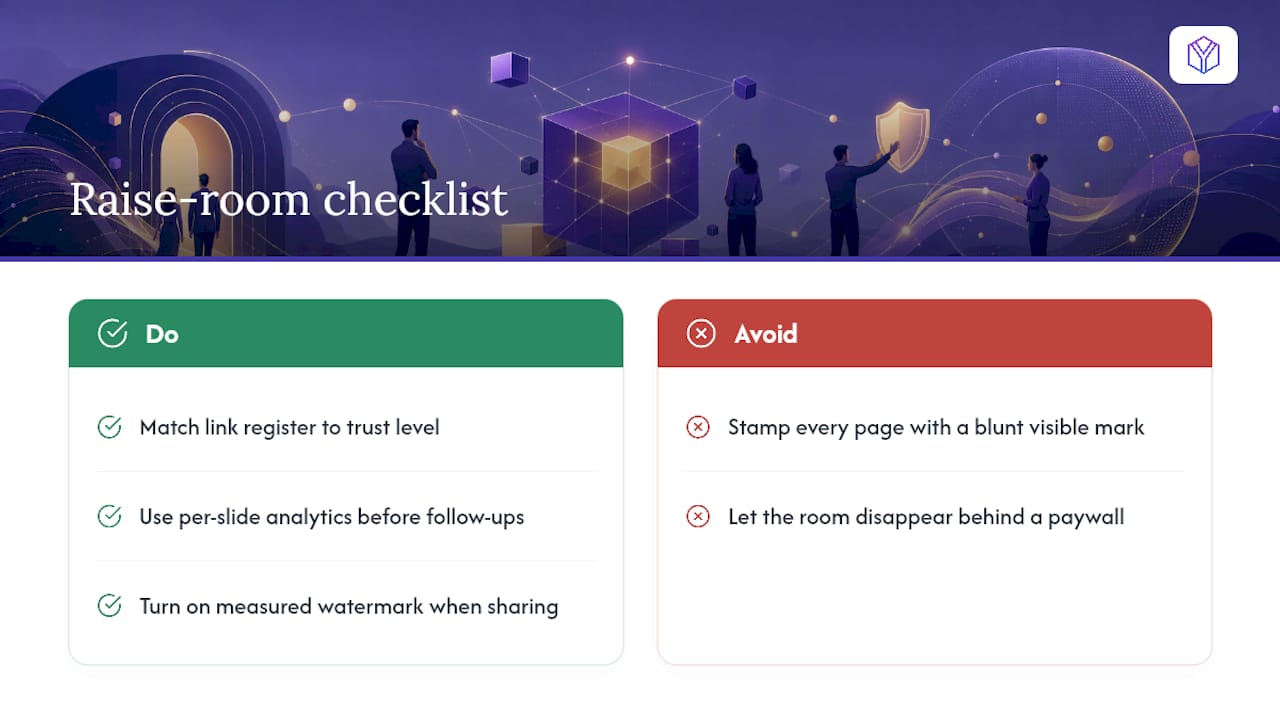
A pitch deck is the clearest real-world case for stacking controls instead of picking one. Investors expect low friction, but founders still need to know who’s actually reading. BabyLoveRaise’s raise room handles both sides at once: a single link replaces the emailed PDF, per-slide analytics show who opened the deck and which slides held attention, and downloads can carry a measured watermark instead of a blunt visible stamp across every page.
Share links come in three registers, first send, forwardable, and private, so a founder can widen distribution for a cold outreach list while keeping a tighter, trackable link for serious conversations. When the raise closes, the room converts to a permanent archive rather than disappearing behind a paywall. The checklist is simple: match your link register to the recipient’s trust level, turn on watermarking for anything leaving your direct control, and check per-slide engagement before every follow-up call.
Why the Real Failure Isn’t the Control, It’s the Follow-Through
Most people overthink the password versus watermark decision and underthink enforcement. A password with a weak string is worse than no password, because it creates false confidence. A watermark nobody ever checks for is decoration. For anything with real stakes, layer both rather than picking a side.
Deterrence only works if people believe you’ll actually trace a leak, and enforceability only works if you test your setup before you rely on it. If I had one tactical note: send yourself the file as if you were the recipient, try to break it, then decide if you’re comfortable with what survives.
— Paul
Protect Your Deck With BabyLoveRaise Instead of Guessing Which Control to Use
BabyLoveRaise gives founders a faster answer than choosing between a password and a watermark on their own: one raise room that handles both, plus the visibility a static PDF never gives you. Every recipient gets a link tuned to their trust level, first send, forwardable, or private, and every download carries a measured watermark instead of a generic stamp.
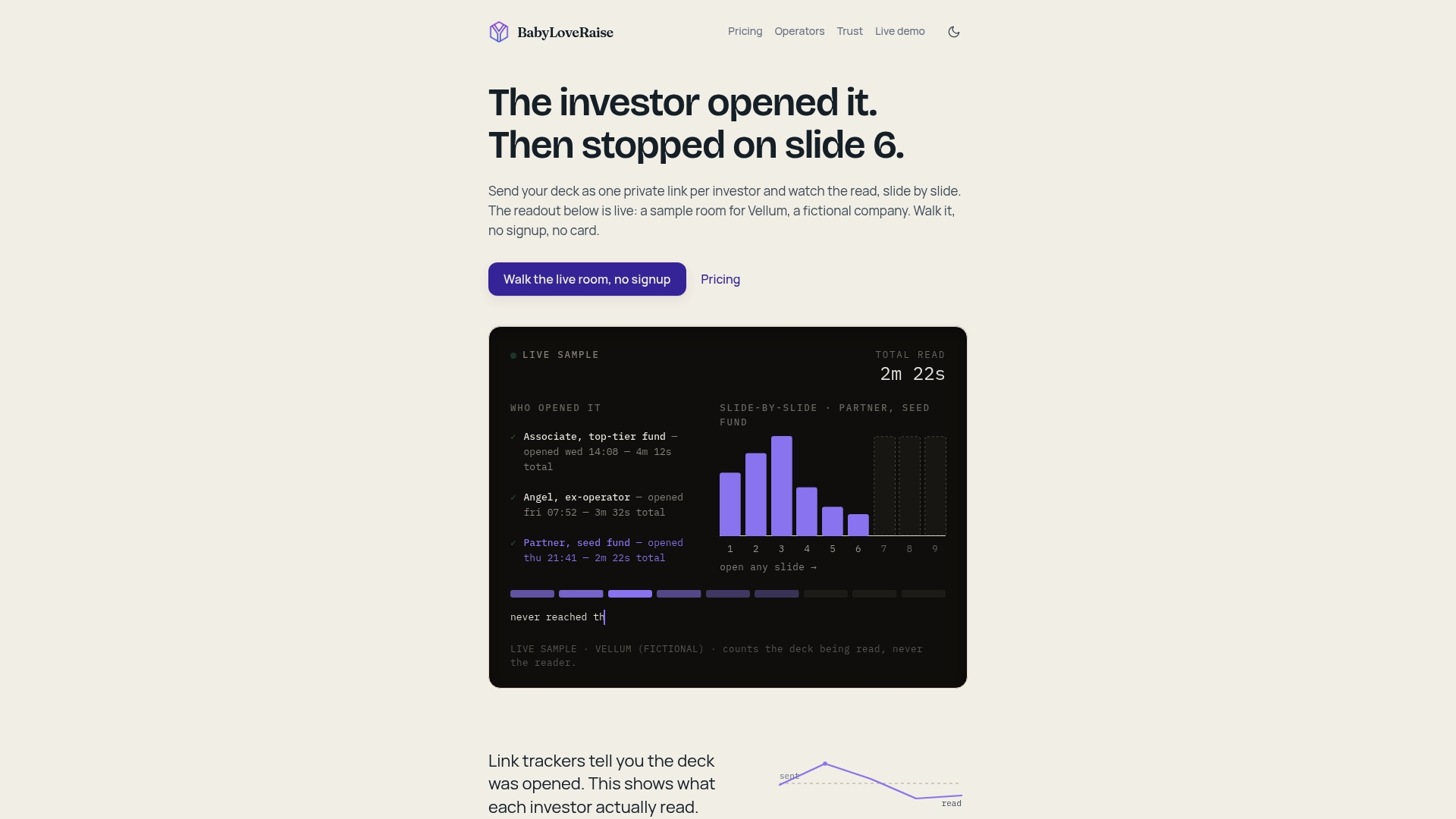
You still get the deterrence a watermark provides and the access discipline a password offers, but layered into one workflow instead of two separate tools you have to remember to update. Per-slide analytics tell you who read to the last slide and who stalled at slide four, so your follow-up goes to actual readers instead of a guess. When your round closes, the room becomes a free permanent archive rather than vanishing behind a paywall. Set up your first raise room at BabyLoveRaise and send your next deck with a real answer to who’s actually reading it.
Sources
- How to secure a PDF · Nitro
- What is watermarking? The essential guide to protecting your content · Dropbox
- Watermarks: Protecting Digital Content with Visible, Invisible, and Forensic Watermarking · NYU
- Protect PDF vs. Watermark vs. Redact — Which to use · PDFBear